- Why Vertical Taskbars Matter
- PowerToys: Microsoft’s Experimental Playground
- What We Know About the PowerDock Feature
- Why Microsoft Removed Taskbar Movement in the First Place
- Could This Feature Return to Core Windows?
- The Bigger Picture: Customization vs. Simplicity
- Should You Try the Experimental PowerDock?
- Frequently Asked Questions (FAQ)
- 1. Why can’t the Windows 11 taskbar be moved like in Windows 10?
- 2. Did Windows 10 really support a vertical taskbar?
- 3. What is PowerToys, and why is it important?
- 4. What is the new PowerToys feature related to the taskbar?
- 5. Is the vertical taskbar officially back in Windows 11?
- 6. Where can users try this experimental taskbar feature?
- 7. Is it safe to use experimental PowerToys features?
- 8. Does Microsoft plan to restore taskbar customization in Windows 11?
- 9. Why do users want a vertical taskbar so badly?
- 10. Could this PowerToys experiment influence future Windows updates?
- 11. Will this feature appear in Windows 12?
- 12. Are there third-party alternatives to move the Windows 11 taskbar?
- 13. Why did Microsoft remove taskbar flexibility in the first place?
- 14. Can average users expect this feature anytime soon?
- 15. What does this experiment say about Microsoft’s direction?
When Microsoft released Windows 11, it introduced a refreshed visual design, centered Start menu, rounded corners, and a modernized user interface intended to feel cleaner and more intuitive. However, alongside these visual upgrades came a number of removed or restricted customization features. One of the most controversial changes was the removal of the ability to move the taskbar freely around the screen.
In Windows 10 and earlier versions, users could drag the taskbar to the left, right, or top of the display, enabling vertical taskbar layouts that were especially popular among productivity-focused users and those with ultrawide or multi-monitor setups. Windows 11 removed this flexibility entirely, locking the taskbar to the bottom of the screen.
Despite generally positive feedback for Windows 11, this single limitation has continued to frustrate a significant portion of the user base. Now, thanks to experimentation within Microsoft PowerToys, there is renewed hope that vertical or movable taskbars could be making a comeback.
This article explores the history of the Windows taskbar, why vertical taskbars matter, what PowerToys is experimenting with today, and what this could mean for the future of Windows customization.
The Evolution of the Windows Taskbar
From Windows 95 to Windows 10
The Windows taskbar first appeared in Windows 95 as a simple horizontal bar at the bottom of the screen. It quickly became a defining feature of the Windows experience, serving as the central hub for open applications, system notifications, and the Start menu.
As Windows evolved, the taskbar gained new capabilities:
- Windows XP introduced grouping and quick launch icons.
- Windows Vista and 7 added thumbnail previews and pinned apps.
- Windows 8 and 10 expanded customization options, including resizing, auto-hide, and full positional freedom.
By the time Windows 10 matured, users had extensive control over how and where the taskbar appeared. Vertical taskbars became a favorite among developers, writers, and power users who valued vertical screen space.
Windows 11: A Design Reset with Trade-Offs
Windows 11 marked a major architectural shift. The taskbar was rebuilt using modern XAML-based components instead of legacy Win32 code. While this allowed for smoother animations and better touch support, it also meant that many features had to be rebuilt from scratch.
As a result, Microsoft shipped Windows 11 with:
- No vertical or top-positioned taskbars
- Limited resizing options
- Reduced right-click functionality
Microsoft stated that these features might return later, but progress has been slow.
Why Vertical Taskbars Matter
Productivity and Screen Real Estate
Vertical taskbars are not just an aesthetic preference. They provide tangible benefits:
- More vertical space for documents, websites, and code editors
- Better alignment with widescreen and ultrawide monitors
- Improved readability for long task lists
For users working with text-heavy applications or timelines, reclaiming vertical pixels can significantly improve workflow efficiency.
Accessibility and Ergonomics
Some users rely on vertical taskbars for accessibility reasons. Larger icons stacked vertically can be easier to scan, and positioning UI elements closer to the natural line of sight can reduce strain.
Removing this option limits how users can adapt Windows to their individual needs.
PowerToys: Microsoft’s Experimental Playground
What Is PowerToys?
PowerToys is a free, open-source utility developed by Microsoft that provides advanced tools for power users. Originally released for Windows 95, PowerToys was revived for Windows 10 and continues to evolve with Windows 11.
Popular PowerToys features include:
- FancyZones (advanced window management)
- PowerRename (bulk file renaming)
- Keyboard Manager
- Mouse utilities
PowerToys is where Microsoft often tests ideas that may later become official Windows features.
The PowerDock Experiment
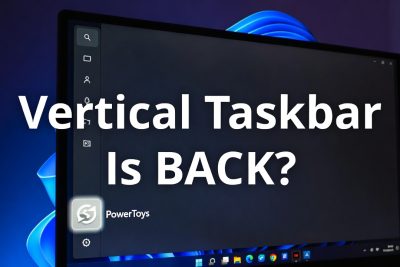
Recent discussions from PowerToys developer Laute and his team revealed an experimental feature internally referred to as PowerDock. This project explores advanced taskbar behavior, including docking the taskbar to different edges of the screen.
Although still early and hidden behind developer branches such as dev/migrie/f/powerdock, this experiment has reignited community interest.
What We Know About the PowerDock Feature
Early Development and Limitations
At the moment, PowerDock is not production-ready. It is a proof-of-concept rather than a polished feature. Users experimenting with the GitHub branch report:
- Inconsistent behavior
- Limited compatibility with multi-monitor setups
- Lack of full system integration
However, the mere existence of the experiment suggests Microsoft is listening to user feedback.
Community Reaction
The Windows enthusiast community has responded with cautious optimism. While many are excited, others remain skeptical due to Microsoft’s slow pace in restoring removed features.
Still, PowerToys has historically served as a testing ground for features that later became native, making this development significant.
Why Microsoft Removed Taskbar Movement in the First Place
Understanding Microsoft’s decision requires looking at the technical challenges behind Windows 11:
- Modern UI Rewrite – The taskbar was rebuilt from scratch.
- Consistency Across Devices – Touch, tablet, and desktop experiences needed alignment.
- Performance Optimization – Simplifying layout options reduced complexity.
Unfortunately, this simplification came at the cost of customization.
Could This Feature Return to Core Windows?
PowerToys as a Testing Ground
Microsoft has previously used PowerToys to validate demand. Features like FancyZones influenced later window management improvements in Windows itself.
If PowerDock proves stable and popular, it could:
- Become an official Windows feature
- Be partially integrated into taskbar settings
- Remain a PowerToys-exclusive tool
Windows 12 and Beyond
With rumors swirling about Windows 12, many analysts believe Microsoft is re-evaluating user customization. Vertical taskbars could reappear as part of a broader push toward flexibility and AI-assisted layouts.
The Bigger Picture: Customization vs. Simplicity
Microsoft faces a constant tension between:
- Power user flexibility
- Mainstream simplicity
Windows 11 prioritized a streamlined experience, but feedback shows that removing options can alienate loyal users.
PowerToys may represent a compromise: advanced features without overwhelming casual users.
Should You Try the Experimental PowerDock?
For most users, the answer is not yet. Experimental builds can be unstable and are best left to developers and enthusiasts.
However, if you enjoy testing cutting-edge features and understand the risks, exploring PowerToys branches can be an exciting glimpse into the future of Windows.
The possible return of a movable or vertical taskbar through PowerToys is more than just a nostalgic feature revival. It represents Microsoft acknowledging long-standing user feedback and exploring ways to restore meaningful customization to Windows.
While there is no official confirmation that vertical taskbars will return to Windows 11 or future versions, the PowerDock experiment is a promising sign. Whether it becomes a core feature or remains an optional tool, it proves that the conversation is far from over.
For millions of Windows users who miss the freedom of earlier versions, this small experiment could signal a big shift ahead.
Frequently Asked Questions (FAQ)
1. Why can’t the Windows 11 taskbar be moved like in Windows 10?
Windows 11 introduced a redesigned taskbar built with a new framework. As part of this redesign, Microsoft removed the ability to move the taskbar to the sides or top of the screen, limiting it to the bottom position only.
2. Did Windows 10 really support a vertical taskbar?
Yes. Windows 10 allowed users to drag the taskbar to the left, right, top, or bottom of the screen. Many users preferred the vertical taskbar for ultrawide monitors and productivity workflows.
3. What is PowerToys, and why is it important?
PowerToys is an official Microsoft utility suite designed to add advanced features and productivity tools to Windows. It often serves as a testing ground for experimental features that may later be integrated into Windows itself.
4. What is the new PowerToys feature related to the taskbar?
Developers within the PowerToys project are experimenting with a feature (internally referred to as PowerDock) that explores alternative taskbar layouts, including vertical positioning.
5. Is the vertical taskbar officially back in Windows 11?
No. As of now, this feature is not officially available in Windows 11. It is still experimental and only accessible through a development branch of PowerToys.
6. Where can users try this experimental taskbar feature?
Advanced users can experiment with it via the dev/migrie/f/powerdock branch of PowerToys, which is available on GitHub. This is intended for testing only and not for everyday use.
7. Is it safe to use experimental PowerToys features?
Experimental features may be unstable, incomplete, or buggy. They are not recommended for production systems or non-technical users, as they can cause unexpected behavior.
8. Does Microsoft plan to restore taskbar customization in Windows 11?
Microsoft has not officially confirmed plans to restore full taskbar movement. However, community demand and PowerToys experimentation suggest the company is at least exploring possible solutions.
9. Why do users want a vertical taskbar so badly?
Vertical taskbars save horizontal screen space, improve usability on widescreen monitors, and make better use of modern display resolutions. Many power users consider it essential for productivity.
10. Could this PowerToys experiment influence future Windows updates?
Yes. Historically, several PowerToys features—such as FancyZones-like window management ideas—have influenced native Windows features. While not guaranteed, successful experiments can shape future Windows releases.
11. Will this feature appear in Windows 12?
There is no confirmation yet. However, given the ongoing criticism of Windows 11’s taskbar limitations, taskbar flexibility is widely expected to be reconsidered in future Windows versions.
12. Are there third-party alternatives to move the Windows 11 taskbar?
Yes. Tools like StartAllBack, ExplorerPatcher, and Start11 offer additional taskbar customization, but they are unofficial and may break after Windows updates.
13. Why did Microsoft remove taskbar flexibility in the first place?
Microsoft prioritized a simplified design, consistent animations, and touch-friendly behavior. Unfortunately, this came at the cost of advanced customization options.
14. Can average users expect this feature anytime soon?
Not in the near term. If Microsoft adopts the idea, it would likely arrive first as an optional or experimental feature in insider builds before a public release.
15. What does this experiment say about Microsoft’s direction?
It suggests that Microsoft is listening to long-standing feedback and may be more open to restoring power-user features—especially when demand remains strong over multiple years.