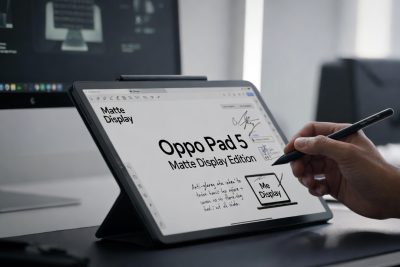
For years, tablets have lived in an awkward space between smartphones and laptops. Too big to be ultra-portable like a phone, yet often too limited to replace a full computer, many tablets have struggled to define a clear identity. With the launch of the Oppo Pad 5 Matte Display Edition, Oppo is making a strong statement: tablets can be serious productivity tools, not just devices for entertainment.
The Oppo Pad 5 Matte Display Edition combines a large anti-glare matte display, a suite of AI-powered productivity features, deep stylus and keyboard support, and seamless cross-device integration. Rather than competing solely on raw performance, Oppo is focusing on how people actually work, study, and collaborate in 2026.
This article explores the Oppo Pad 5 Matte Display Edition in depth—from its display technology and AI capabilities to its ecosystem integration, battery life, and real-world use cases—while also examining how it fits into the evolving tablet market.
The Rise of Productivity-Focused Tablets
In recent years, the definition of productivity has changed dramatically. Work is no longer confined to desks and offices. Students attend lectures online, professionals jump between meetings and locations, and creatives brainstorm wherever inspiration strikes. Devices must adapt to this reality.
Tablets are uniquely positioned for this shift. They offer larger screens than smartphones, greater portability than laptops, and intuitive input through touch and stylus. However, without the right software and hardware balance, they fall short.
Oppo’s Pad 5 Matte Display Edition is clearly designed to address these gaps by focusing on three pillars:
-
Visual comfort for long working sessions
-
AI-assisted note-taking and organization
-
Flexible input and ecosystem connectivity
Matte Display Technology: Redefining Visual Comfort
A 12.1-Inch 2.8K Anti-Glare Screen
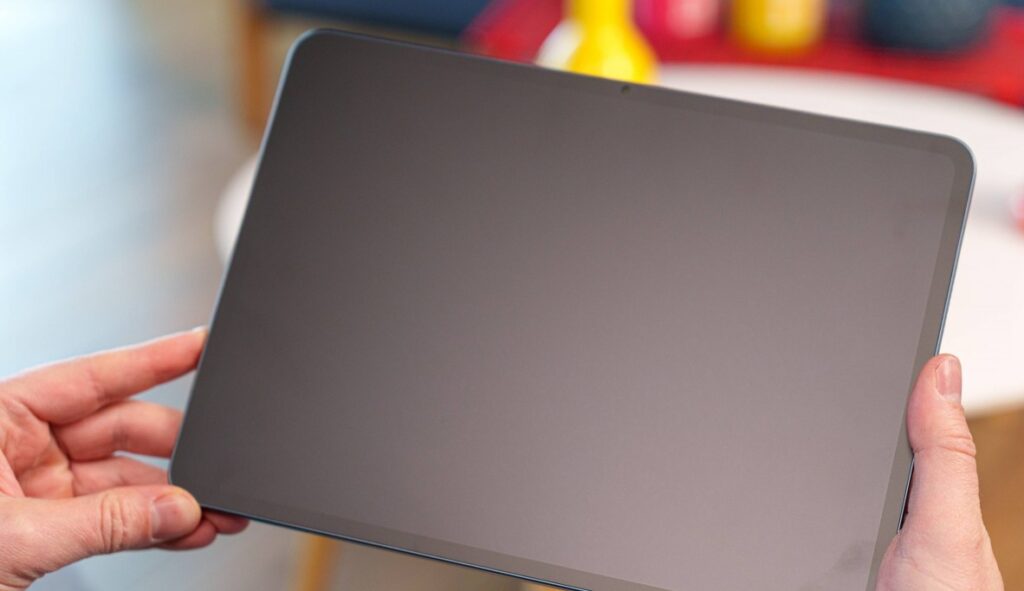
The centerpiece of the Oppo Pad 5 Matte Display Edition is its 12.1-inch display with a 2.8K resolution. While these specifications are impressive on their own, what truly sets the tablet apart is its Anti-Glare Matte Display technology.
Unlike traditional glossy screens, which reflect ambient light and strain the eyes, Oppo’s matte display uses a nano-texture coating designed to scatter reflections. According to Oppo, this technology:
-
Reduces light reflection by up to 97%
-
Improves perceived clarity by 22%
-
Minimizes glare under direct lighting conditions
This makes the tablet particularly suitable for use in bright offices, classrooms, cafés, or outdoor environments.
TÜV Rheinland Eye Protection Certification
Extended screen time often leads to eye fatigue, especially for students and professionals. To address this, the Oppo Pad 5 Matte Display Edition has earned TÜV Rheinland certification, ensuring reduced blue light exposure and improved visual comfort.
For users who spend hours reading documents, editing notes, or attending virtual meetings, this certification is more than just a badge—it translates into real-world comfort.
Designed for Writing, Reading, and Thinking
A Paper-Like Experience for Stylus Users
Matte displays are especially valuable for stylus-based input. Writing on glossy glass surfaces often feels slippery and unnatural. Oppo’s matte coating introduces subtle friction, creating a paper-like writing experience.
When paired with the Oppo Pencil 2R, the tablet feels closer to a digital notebook than a traditional touchscreen device. This makes it ideal for:
-
Handwritten notes
-
Mind mapping
-
Sketching and diagramming
-
Annotating PDFs and documents
AI at the Core of Productivity
Artificial intelligence is no longer a novelty—it is rapidly becoming an essential productivity layer. Oppo has embraced this shift by embedding AI deeply into the Pad 5 Matte Display Edition’s software experience.
AI Recording Summary: Meetings and Lectures, Simplified
One of the most compelling features is AI Recording Summary. This tool automatically processes audio recordings from meetings, lectures, or discussions and generates:
-
Full transcriptions
-
Smart titles
-
Concise summaries of key points
Instead of frantically taking notes, users can focus on listening and engaging, knowing the AI will organize the information afterward.
This feature is especially useful for:
-
Students attending long lectures
-
Professionals in back-to-back meetings
-
Journalists and researchers conducting interviews
Real-Time Handwriting Polish
Handwritten notes are fast and natural, but they are not always neat. Oppo’s Real-Time Handwriting Polish uses AI to refine handwritten text instantly.
The system:
-
Preserves the original writing style
-
Improves legibility
-
Maintains spacing and alignment
The result is clean, readable notes without the need to rewrite them later.
Circle to Note: Capturing Ideas Instantly
The Circle to Note feature allows users to simply draw a circle around any content on the screen—text, images, or diagrams—using the Oppo Pencil 2R. The selected content is immediately copied into the notes app.
This feature streamlines research and brainstorming workflows by eliminating multiple steps such as copying, pasting, or switching apps.
AI Search Across Handwritten and Typed Notes
Finding information in handwritten notes has traditionally been difficult. Oppo addresses this challenge with AI Search, which allows users to search keywords across both handwritten and typed content.
Whether the notes were written with a stylus or typed on the keyboard, the AI can recognize and retrieve relevant information quickly.
Hardware That Supports All-Day Work
A Massive 10,050 mAh Battery
Productivity devices must last through long days without constant charging. The Oppo Pad 5 Matte Display Edition features a 10,050 mAh battery, which Oppo claims can deliver:
-
Over 15 hours of video playback
-
A full day of mixed productivity tasks
For students and professionals on the move, this battery capacity ensures reliability throughout the day.
Performance and Stability
While Oppo has not positioned the Pad 5 Matte Display Edition as a gaming-focused tablet, it delivers stable and responsive performance for productivity workloads such as:
-
Document editing
-
Video conferencing
-
Multitasking between apps
-
Note-taking and annotation
The emphasis is clearly on consistency and efficiency rather than raw benchmark scores.
Keyboard and Stylus: A Laptop Alternative?
Smart Keyboard Support
The optional Smart Keyboard transforms the tablet into a laptop-like device. Combined with the large display and multitasking features, users can comfortably:
-
Write long documents
-
Respond to emails
-
Work on presentations
-
Manage spreadsheets
This makes the Oppo Pad 5 Matte Display Edition a viable alternative to entry-level laptops for many users.
Oppo Pencil 2R: Precision and Responsiveness
The Oppo Pencil 2R enhances the tablet’s creative and productivity capabilities. With low latency and pressure sensitivity, it is suitable for:
-
Detailed handwriting
-
Drawing and sketching
-
Precision editing
The stylus integrates seamlessly with AI features like Circle to Note and handwriting recognition.
Cross-Device Integration: A Connected Workflow
One of the most interesting aspects of the Oppo Pad 5 Matte Display Edition is its cross-platform ecosystem support. The tablet can integrate with:
-
Other Oppo devices
-
iOS devices
This enables features such as:
-
Automatic mobile hotspot sharing
-
Fast file transfers
-
Seamless workflow continuity across devices
In a world where users often rely on multiple devices, this interoperability is a major advantage.
Pricing and Market Positioning
The Oppo Pad 5 Matte Display Edition is offered at a promotional price of IDR 6,999,000, following a cashback incentive, valid until February 15, 2026.
At this price point, Oppo positions the tablet as:
-
More affordable than premium flagship tablets
-
More capable than basic entertainment-focused tablets
It targets users who want maximum productivity value without paying laptop-level prices.
Who Is the Oppo Pad 5 Matte Display Edition For?
This tablet is particularly well-suited for:
-
Students who take extensive handwritten notes
-
Professionals who attend frequent meetings
-
Educators who annotate and present materials
-
Writers and researchers who value reading comfort
-
Remote workers seeking a lightweight productivity device
The Bigger Picture: Tablets in 2026
The Oppo Pad 5 Matte Display Edition reflects a broader industry trend: tablets are evolving into hybrid productivity tools. As AI becomes more capable and displays become more comfortable, tablets are no longer secondary devices—they are becoming central to modern workflows.
Oppo’s approach emphasizes usability, comfort, and intelligence rather than competing solely on specifications. This strategy aligns well with how people actually work today.
Conclusion: A Thoughtful Take on Modern Productivity
The Oppo Pad 5 Matte Display Edition is not just another tablet. It represents a thoughtful reimagining of what a productivity device can be in the age of AI.
By combining:
-
A matte, eye-friendly display
-
AI-powered note-taking and organization
-
Strong stylus and keyboard support
-
Long battery life
-
Cross-device integration
Oppo has created a tablet that feels purpose-built for work and learning in 2026.
For users seeking a balanced, intelligent, and comfortable productivity tablet, the Oppo Pad 5 Matte Display Edition stands out as a compelling choice.
Frequently Asked Questions (FAQ)
1. What is the Oppo Pad 5 Matte Display Edition?
The Oppo Pad 5 Matte Display Edition is a productivity-focused tablet designed for work, study, and creative tasks. It features a 12.1-inch 2.8K anti-glare matte display, AI-powered productivity tools, stylus support, and long battery life.
2. What makes the Matte Display different from a regular tablet screen?
The matte display uses nano-texture technology to reduce reflections by up to 97%. This minimizes glare, improves visual clarity, and provides a more comfortable, paper-like experience compared to traditional glossy screens.
3. Is the Oppo Pad 5 Matte Display Edition good for note-taking?
Yes. The tablet is specifically optimized for note-taking with AI features such as real-time handwriting polish, AI search for handwritten notes, and stylus support using the Oppo Pencil 2R.
4. What AI features are available on the Oppo Pad 5?
The tablet includes several AI-powered productivity features, such as:
-
AI Recording Summary
-
Real-Time Handwriting Polish
-
Circle to Note
-
AI Search across handwritten and typed notes
These tools help users save time and stay organized.
5. Can the Oppo Pad 5 automatically summarize meetings or lectures?
Yes. The AI Recording Summary feature can transcribe audio recordings and generate smart summaries and titles from meetings, lectures, or discussions.
6. Does the Oppo Pad 5 support a stylus?
Yes. The tablet supports the Oppo Pencil 2R, which allows precise handwriting, drawing, and interaction with AI features like Circle to Note.
7. Is the Oppo Pad 5 suitable for students?
Absolutely. Its large eye-friendly display, AI note-taking tools, long battery life, and lightweight design make it ideal for students attending lectures, taking notes, and studying for long periods.
8. Can the Oppo Pad 5 replace a laptop?
For many users, yes. With the optional Smart Keyboard, multitasking capabilities, and productivity apps, the Oppo Pad 5 can handle writing, presentations, emails, and online meetings, making it a practical laptop alternative for everyday tasks.
9. How long does the battery last on the Oppo Pad 5?
The Oppo Pad 5 is equipped with a 10,050 mAh battery, which can deliver more than 15 hours of video playback and easily last a full day of productivity use.
10. Is the display safe for long-term eye use?
Yes. The tablet has TÜV Rheinland certification, ensuring reduced blue light exposure and improved eye comfort during extended usage.
11. Does the Oppo Pad 5 support cross-device connectivity?
Yes. It supports seamless integration with other Oppo devices and iOS devices, enabling fast file transfers and automatic mobile network sharing.
12. Is the Oppo Pad 5 Matte Display Edition good for creative work?
Yes. The matte screen, stylus support, and responsive performance make it suitable for sketching, brainstorming, annotating documents, and light creative design work.
13. Can I search text inside handwritten notes?
Yes. The AI Search feature allows users to search keywords within both handwritten and typed notes, making information retrieval fast and efficient.
14. What accessories are available for the Oppo Pad 5?
Available accessories include the Oppo Pencil 2R for stylus input and a Smart Keyboard for a laptop-like typing experience. These accessories are sold separately or through bundled packages.
15. Who should buy the Oppo Pad 5 Matte Display Edition?
This tablet is ideal for students, professionals, educators, remote workers, and anyone looking for a comfortable, AI-powered productivity tablet rather than a device focused only on entertainment.